
Active MP3 Tray2.0 - Download
You'll be able to download in few seconds.
Publisher Description
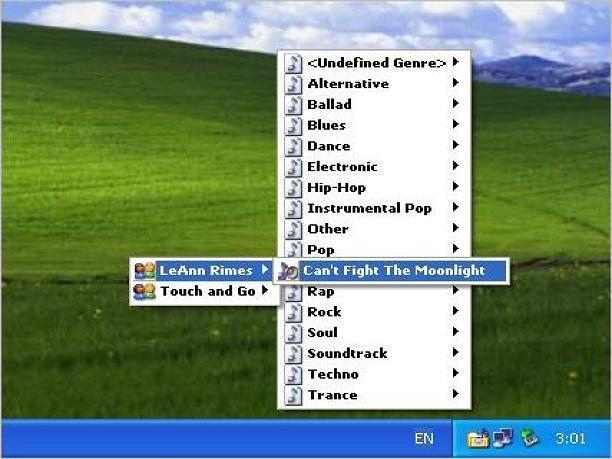
Active MP3 Tray is a powerful music manager and mp3 organizer which helps you to organize and manage all music files on your computer. It scans your hard disks for MP3 files and builds popup menu with songs genres which can be accessed via icon in the system tray area. Each menu item opens submenu with groups and songs.
Active MP3 Tray organizer allows to play files in your favorite player or build a queue directly from the menu for that player. Program is very customizable. You can assign your own hotkeys for each operation. Active MP3 Tray supports multiligual interfaces.
Active MP3 Tray is an easy-to-use tool that gives you quick access to your MP3 files on your hard drive, without taking up a lot of desktop space. This mp3 organizer scans your entire hard drive for MP3 and WAV files, and lists them on a tray-based menu categorically, by genre, artist, album's name and year, ready to launch with the MP3 player of your choice.
You can build a queue directly with a right click from any program's track list menu, as well as edit ID3 tags. Other nice features include configuring menu sort order, assigning a custom hotkey for popping up its menu, and specifying a different font for each menu level.
About Active MP3 Tray
This Audio File Players program is available in English. It was last updated on 29 September, 2026. Active MP3 Tray is compatible with the following operating systems: Windows.
The company that develops Active MP3 Tray is Media5 Software, Inc.. The latest version released by its developer is 2.0.
The download we have available for Active MP3 Tray has a file size of N/A. Just click the green Download button above to start the downloading process. The program is listed on our website since 2006-10-24 and was downloaded 0 times. We have already checked if the download link is safe, however for your own protection we recommend that you scan the downloaded software with your antivirus. Your antivirus may detect the Active MP3 Tray as malware if the download link is broken.
How to install Active MP3 Tray on your Windows device:
- Click on the Download button on our website. This will start the download from the website of the developer.
- Once the Active MP3 Tray is downloaded click on it to start the setup process (assuming you are on a desktop computer).
- When the installation is finished you should be able to see and run the program.
Program Details
System requirements
Download information
Pricing
Version History
version 2.0
posted on 2006-10-24
New interface
Tooltips support
Onlien manual
Disclaimer
External Download
We do not host Active MP3 Tray on our servers. We did not scan it for viruses, adware, spyware or other type of malware. This app is hosted by the software publisher and passed their terms and conditions to be listed there. We recommend caution when installing it.
The external download link for Active MP3 Tray is provided to you by apps112.com without any warranties, representations or guarantees of any kind, so access it at your own risk.
If you have questions regarding this particular app contact the publisher directly. For questions about the functionalities of apps112.com contact us.
